
Deploy a Smart Contract Using Remix
Overview
This tutorial guides you to implement a Hello World dApp which echoes a message passed to the contract on to the frontend. You will also be able to change the message using the interactive panel.
RECOMMENDED
We recommend you to follow this tutorial using the online IDE available at Remix IDE. Remix IDE is an easy-to-use platform that does not require any downloads, creating accounts, or logins.
What you will do
- Create a file on Remix
- Upload a pre-built smart contract into the IDE
- Compile the smart contract
- Connect the application to the SECRYPT Testnet via Metamask
- Deploy the smart contract
- Verify the smart contract
Getting started with Remix IDE
Remix is a Ethereum-focused IDE: an online platform to develop and deploy smart contracts. To start building a smart contract, click on New File and name it HelloWorld.sol.
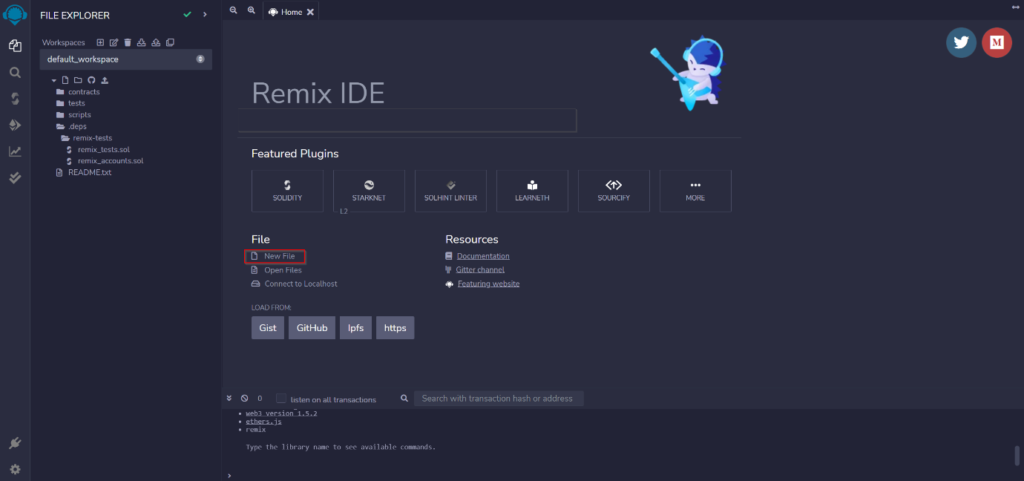
Smart Contract
Copy and paste the Smart Contract code provided below into the newly created HelloWorld.sol file.
HelloWorld.sol
// Specifies that the source code is for a version
// of Solidity greater than 0.5.10
pragma solidity ^0.5.10;
// A contract is a collection of functions and data (its state)
// that resides at a specific address on the Ethereum blockchain.
contract HelloWorld {
// The keyword “public” makes variables accessible from outside a contract
// and creates a function that other contracts or SDKs can call to access the value
string public message;
// A special function only run during the creation of the contract
constructor(string memory initMessage) public {
// Takes a string value and stores the value in the memory data storage area,
// setting `message` to that value
message = initMessage;
}
// A publicly accessible function that takes a string as a parameter
// and updates `message`
function update(string memory newMessage) public {
message = newMessage;
}
}
The first line pragma solidity ^0.5.10 specifies that the source code is for a Solidity version greater than 0.5.10. Pragmas are common instructions for compilers about how to treat the source code (e.g., pragma once).
A contract in the sense of Solidity is a collection of code (its functions) and data (its state) that resides at a specific address on the Ethereum blockchain. The line string public message declares a public state variable called message of type string. You can think of it as a single slot in a database that you can query and alter by calling functions of the code that manages the database. The keyword public automatically generates a function that allows you to access the current value of the state variable from outside of the contract. Without this keyword, other contracts have no way to access the variable.
The constructor is a special function run during the creation of the contract and cannot be called afterward. In this case, it takes a string value initMessage, stores the value in the memory data storage area, and sets message to that value.
The update function is another public function that is similar to the constructor, taking a string as a parameter, and updating the message variable.
Compile Smart Contract
- Go to the Solidity Compiler tab (below the search button)
- Select compiler version to 0.5.10
- Now, compile HelloWorld.sol
- After successful compilation, it will show a green tick mark on the Compiler tab button
Deploying to the SECRYPT Testnet
Now, we have to deploy our smart contract on SECRYPT, SECRYPT Network’s Testnet. Not only does it cost money (e.g., gas fees) to deploy a smart contract on SECRYPT Mainnet, but also, the contract is immutable and can’t be changed once deployed. Therefore, it’s best to first deploy your smart contract to the Testnet first.
To deploy to the SECRYPT testnet, we have to connect to the Web3 world which can be accomplished by using any of the services like Metamask, Brave, Portis, etc. We will be using Metamask in this tutorial. Please follow this guide to set up a Metamask Account.
- Open Metamask. Click on the network dropdown menu (set to Ethereum Mainnet by default) and click on the Add Network button.
RPC endpoint URL below.
-
- Network: SECRYPT Testnet
- New RPC URL (public endpoint): http://ttv-wkqbnkghpr.dynamic-m.com:8543/.
- Chain ID: 1144
- Currency Symbol: SXC
- Block Explorer URL: https://explorer-testnet.secrypt.tech
- Go ahead and click Save
- Copy your wallet address from Metamask by clicking over your account name
- Head over to Faucet and request test SXC – you will need this to pay for gas on the SECRYPT network. Select SECRYPT as the network and SXC Token as the token in the faucet. You can also use this free SXC faucet
- Finally, to deploy to SECRYPT, refer to the instructions in the “Remix deployment” section below
Deploying to SECRYPT Mainnet
After you can deploy on the SECRYPT Testnet without any errors (i.e., the purpose of the Testnet), let’s deploy the Smart Contract on the SECRYPT Mainnet. Remember this will cost real $ in the form of SXC tokens.
Similar to the steps above when you deployed to SECRYPT, you open your Metamask wallet. Click on the network dropdown menu (set to Ethereum Mainnet by default) and click on the Add Network button.
- Open Metamask
- Network Name: SECRYPT Mainnet
- New RPC URL (public endpoint): http://ttv-wkqbnkghpr.dynamic-m.com:8541/.
- Chain ID: 1143
- Currency Symbol: SXC
- Block Explorer URL: https://explorer-mainnet.secrypt.tech
- Go ahead and click Save
- Copy your wallet address from Metamask by clicking over your account name
- Make sure your Metamask wallet has SXC tokens to pay the deployment / gas fees
- Finally, to deploy to SECRYPT, refer to the instructions in the “Remix deployment” section below
Remix Deployment
In both Testnet and Mainnet, you do the below to deploy your smart contract using Remix. The below step will use the connect Metamask API keys you set up in the previous steps.
- Select Injected Provider Metamask in the Environment dropdown and your contract
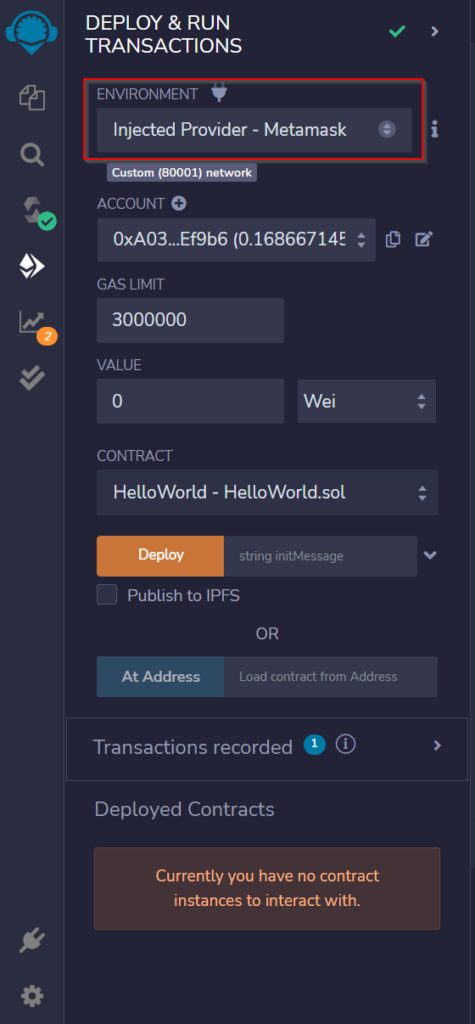
- Accept the Connect request received in MetaMask. If the popup doesn’t open by default, you can also try manually launching the MetaMask extension
- Once MetaMask is connected to Remix, the Deploy transaction would generate another MetaMask popup that requires transaction confirmation. Simply confirm the transaction!
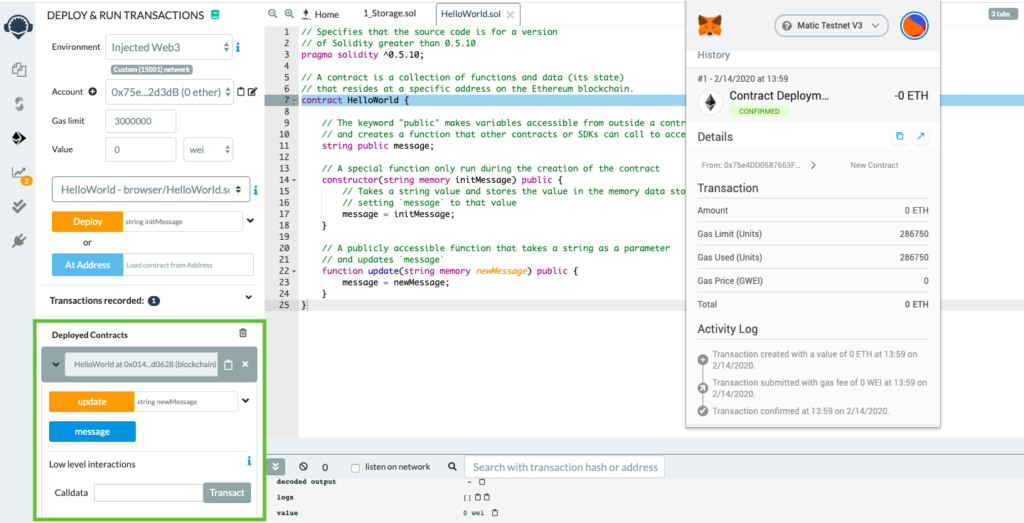
Congratulations! You have successfully deployed the HelloWorld Smart Contract to the SECRYPT Testnet** You can start interacting with your Smart Contract. Check the deployment status at https://explorer-testnet.secrypt.tech
Verifying your Contract
Flatten your Smart Contract
The first and foremost step is to flatten the solidity smart contract into a single file. In order to do that, install truffle-flattener or sol-merger.
After installation, flatten the contract using below command (we have demonstrated using sol-merger).
sol-merger “./contracts/*.sol” ./build
Verifying on SECRYPT scan
- Navigate to your contract’s SECRYPT scan page and click on Verify and Publish.
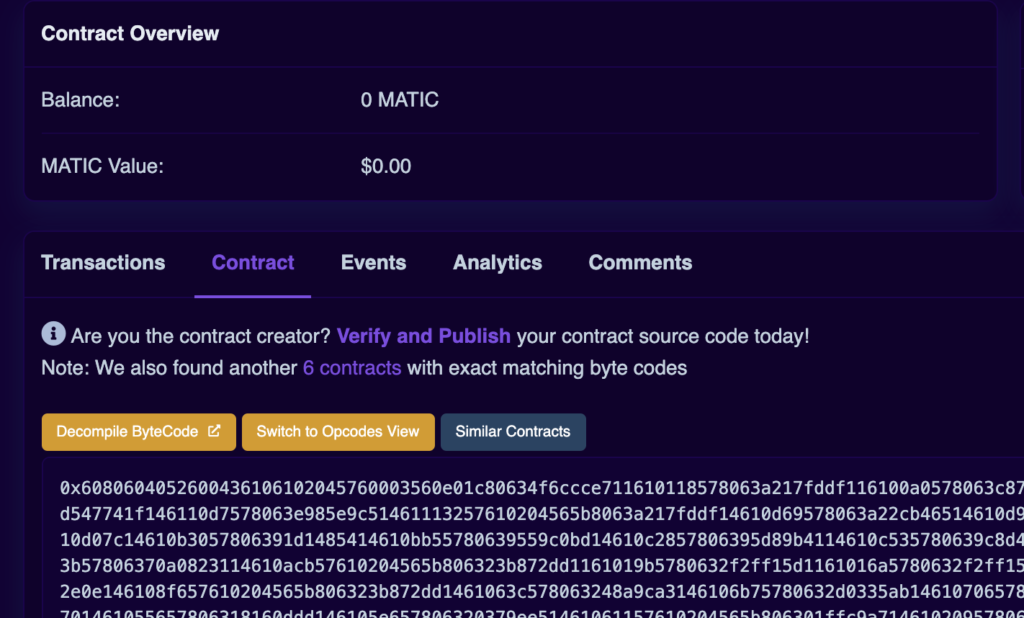
- Select Solidity (Single File) in compiler type
- Select appropriate compiler version
- Choose the license type of your contract
In the next section, paste your flattened samrt contract here. If you had enabled optimization, then adjust the optimization section accordingly.
Constructor arguments should have been filled in automatically. If not, they can be retrieved from the trailing bytes of the deployment transaction (example: 000000000000000000000000a6fa4fb5f76172d178d61b04b0ecd319c5d1c0aa).